Fashion Email Templates
Adapt for Unlimited Possibilities
Fashion
Fashion
Style deserves an inbox presence to match. Pick a ready-made fashion email template, customize it in minutes, and send with Mailpro™.
Why use Fashion email templates?
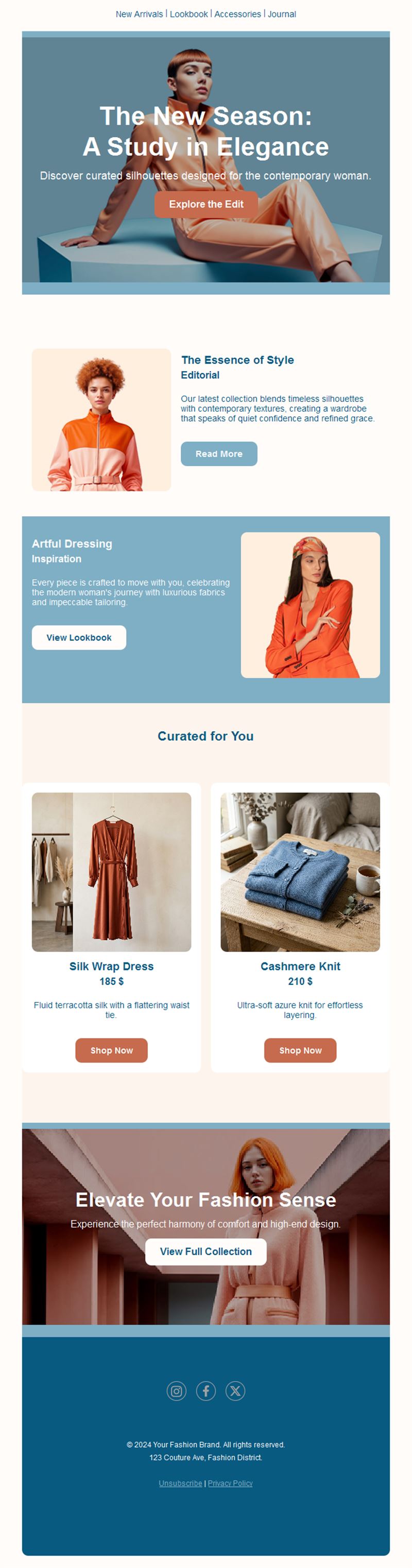
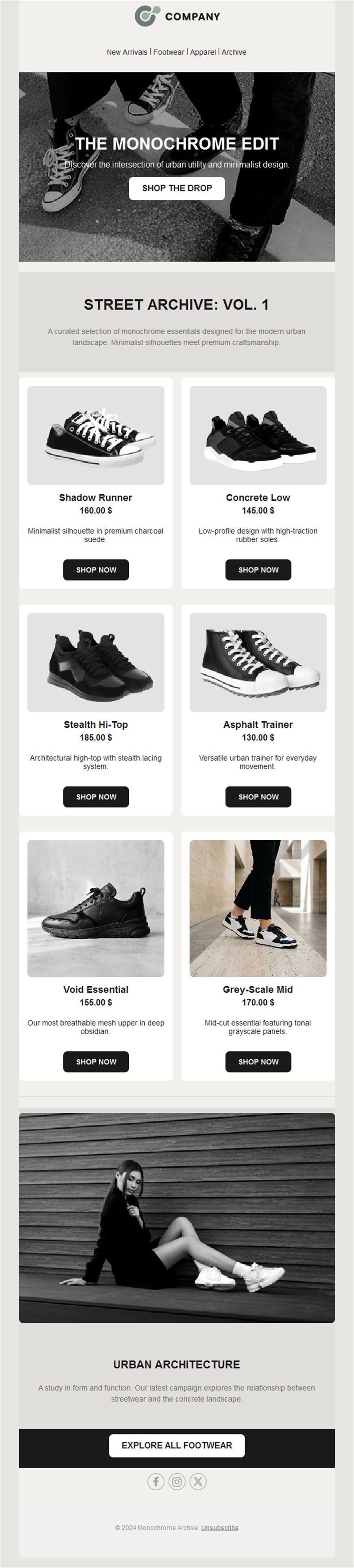
Fashion is visual, seasonal, and fast — exactly what email does best. Editorial-style templates let boutiques, brands, and stylists drop collections, lookbooks, and offers that feel like magazine pages, not flyers.
- Editorial layouts: big imagery and clean typography that let the clothes speak.
- Season-driven rhythm: new drops, capsule collections, and sales give you a reason to email all year.
- Shop-the-look ready: image-to-product links shorten the path from inspiration to cart.
- Boutique to brand: works for a single shop or a full e-commerce line.
What can you send with fashion templates?
1) New collection drops
The season’s arrivals with a hero look and shop-now buttons.
2) Lookbooks
Styled outfits your subscribers can shop piece by piece.
3) Seasonal sales
End-of-season clearance and mid-season offers with clear pricing.
4) Back in stock & pre-orders
Scarcity works: tell wishlisters the moment items return.
5) Style guides & trends
“How to wear it” content that keeps your brand in the conversation between drops.
What's inside each template?
- Full-width hero with the season’s key look.
- Lookbook grid with shop-the-look buttons.
- Offer block for sales and promotions.
- Editorial text section for trends and styling.
- Social links and an easy unsubscribe footer.
How to customize your Fashion email in Mailpro™
- Pick a template: Open Templates and choose a Fashion design.
- Edit copy & images: Use your campaign photography; alt text like “model in camel wool coat”.
- Add a countdown (optional): Count down to a drop or the end of a sale. See how the countdown works.
- Segment your audience: Segment by style, size, or past purchases for sharper drops. Learn segmentation.
- Schedule the send: New drops early in the week; sales toward the weekend. Schedule email campaigns.
- Track results: Monitor opens, clicks, and conversions. View email statistics.
- Automate follow-ups: Auto-alert wishlisters on restocks and new sizes. Set up autoresponders.
Subject line & CTA ideas
Subject lines
- The new collection has landed
- This season’s five essential looks
- 48 hours: up to 50% off everything
- It’s back — in your size
- How to style it: one coat, three ways
CTA ideas
- Shop the Collection
- See the Lookbook
- Shop the Sale
- Get the Look
Best practices for Fashion campaigns
- Photography first: invest in imagery — it carries the entire email.
- One hero look: lead with the strongest piece, grid the rest.
- Keep copy minimal: fashion emails are read visually; let buttons do the talking.
- Consistent drops: a predictable rhythm builds anticipation for every send.
- Mobile always: fashion audiences shop on their phones — test every send there.
FAQ: Fashion email templates
How often should a fashion brand email?
Weekly works for most boutiques — anchored on drops, styling content, and offers. Consistency beats frequency.
What converts best?
New-arrival drops to engaged segments and back-in-stock alerts — scarcity and novelty are fashion’s strongest levers.
Can I recreate my brand aesthetic?
Yes — fonts, colors, spacing, and imagery are fully editable in Mailpro’s drag-and-drop builder.
How do I measure what sells?
Track clicks per look and revenue per send in Mailpro statistics to learn which styles your list loves.
Get started
Dress your inbox for success: pick a fashion email template and drop your next collection in style.