
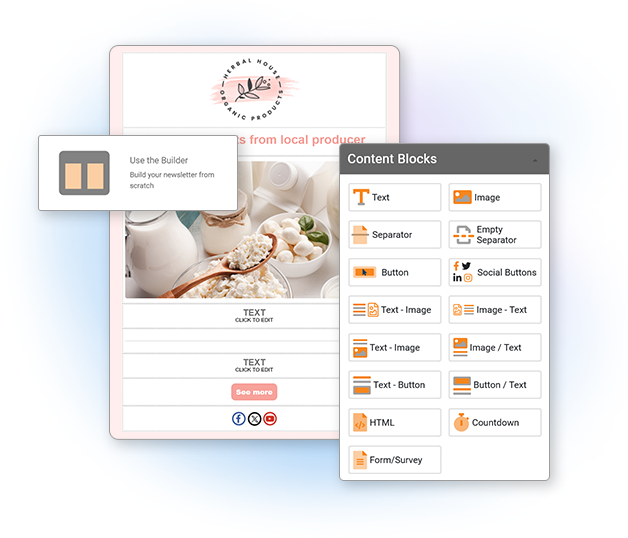
If you're choosing a platform, start with our guide to the best newsletter software for small businesses — criteria, pricing, and a 2026 comparison.
I. Introduction to Newsletters
Hey there! Welcome to our guide on newsletters. If you're wondering what newsletters are and how to create one step by step, you're in the right place.
A newsletter is one of the most effective ways to stay in touch with your audience by email. Businesses, organizations, schools, nonprofits, and creators use newsletters to share updates, promote offers, announce news, and send useful content directly to subscribers.
Email marketing remains one of the most effective and cost-efficient ways to communicate with your audience. A good newsletter helps you build trust, stay visible, and create stronger relationships over time.
In this guide, we'll explain what a newsletter is, why it matters, what to include in it, and how to create a newsletter step by step. We'll also cover design tips, writing advice, personalization, deliverability, and performance tracking so you can build newsletters that look professional and get results.
II. What Is a Newsletter and Why Create One?
A newsletter is a recurring email sent to a list of subscribers. It usually includes updates, announcements, articles, promotions, tips, resources, or company news. Some newsletters are weekly, others monthly, and some are sent only when there is something important to share.
Newsletters are useful because they help you communicate directly with people who have already shown interest in your business or organization. Unlike social media, where visibility depends on algorithms, newsletters land directly in your subscribers' inboxes.
Why should you create a newsletter?
Creating a newsletter can help you:
- Build brand awareness: Stay visible and recognizable.
- Drive traffic: Bring readers to your website, blog, store, or landing pages.
- Increase engagement: Keep subscribers informed and involved.
- Promote products and services: Share offers, launches, and announcements.
- Strengthen customer relationships: Stay connected in a more personal way.
Whether you're a small business, a school, a nonprofit, or an online store, a newsletter can become one of your most valuable communication channels.
III. How to Create a Newsletter Step by Step
If you're wondering how to create a newsletter, here is a simple step-by-step process you can follow:
- Define your goal: Decide what you want your newsletter to achieve. Do you want more sales, more traffic, more event registrations, or better engagement?
- Identify your audience: Think about who will receive the newsletter and what they care about most.
- Choose an email marketing platform: Use a tool that helps you create, send, and track your newsletters professionally.
- Pick a template or layout: Start with a clean design that matches your brand.
- Plan your content: Decide what sections, links, images, and calls to action you want to include.
- Write your subject line and email copy: Make it clear, relevant, and easy to read.
- Personalize where possible: Adapt the message using names, segments, or audience-specific content.
- Test your newsletter: Check links, spelling, layout, and mobile rendering before sending.
- Send or schedule it: Choose the right time and launch your campaign.
- Track performance: Review your results and improve future newsletters based on the data.
This process makes newsletter creation much easier, especially if you're just getting started.
IV. Identifying Your Target Audience

Before creating your newsletter, it is important to know who you are writing for. The more clearly you understand your audience, the easier it becomes to create content that feels relevant and useful.
Imagine sending the same message to everyone without considering their interests, needs, or level of familiarity with your brand. The result is often lower engagement. When you define your audience properly, you can create newsletters that speak more directly to what people actually care about.
You can identify your audience by looking at factors such as age, location, industry, past purchases, behavior, interests, or level of engagement. Once you understand who your subscribers are, you can divide them into groups and send more relevant messages to each one using segmentation.
With Mailpro, you can segment your contacts and tailor your newsletters more effectively. This helps you create emails that feel more personal and useful, which can improve clicks and engagement over time.
V. What to Include in a Newsletter
One of the most common questions people ask is: what should a newsletter actually include?
A good newsletter does not need to be complicated. In most cases, it should contain a few essential elements:
- A clear subject line: This helps people understand what the email is about before opening it.
- A recognizable header: Include your logo or brand name so subscribers instantly know who the email is from.
- A short introduction: Start with a friendly opening or a quick explanation of what is inside.
- Main content section: This could be news, a product update, an article, a promotion, or useful tips.
- Supporting content or links: Add other useful resources, secondary updates, or additional articles if relevant.
- A call to action: Tell readers what to do next, whether that is reading more, visiting a page, registering, or buying.
- A footer: Include your company information and unsubscribe link.
The exact content depends on your goal, but the structure should always feel clear, useful, and easy to scan.
VI. Planning Your Newsletter Content Strategy
Once you know your audience and your goal, the next step is planning your content strategy. This means deciding what kind of content you will send, how often you will send it, and how you will keep it relevant over time.
Before writing anything, define the objective of your newsletter. Do you want to educate your audience, drive sales, increase event registrations, share company updates, or build stronger relationships? Your goal will influence everything from the tone of the email to the CTA you include.
Next, create a simple content calendar. This can help you plan your newsletters around important dates, promotions, launches, seasonal events, or recurring themes. A content calendar makes it easier to stay consistent and avoid sending random emails without a clear purpose.
You can also brainstorm content ideas based on customer questions, common challenges, blog posts, product updates, case studies, FAQs, or industry trends. The best newsletter topics are usually the ones your audience already cares about.
Mailpro makes it easy to plan and schedule newsletters in advance, helping you stay organized and consistent with your email marketing.
VII. Choosing the Right Email Marketing Platform
To create and send newsletters professionally, you need the right email marketing platform. A good platform saves you time, improves design quality, helps you manage your contacts, and gives you the data you need to improve results.
When choosing a platform, look at these important factors:
- Ease of use: Can you create newsletters easily without technical skills?
- Templates and editor: Does the platform offer ready-to-use email templates and a user-friendly editor?
- Segmentation and personalization: Can you target the right contacts with the right message?
- Automation: Does it help you save time with automated emails?
- Statistics: Can you track opens, clicks, and other useful metrics?
- Pricing: Does it match your budget and business needs?
Mailpro gives you all of these essentials in one place. You can create newsletters with customizable templates, manage your lists, personalize content, schedule campaigns, and track your results with detailed statistics.
VIII. Designing Your Newsletter
Now it's time to design your newsletter. Design matters because the way your email looks affects how easy it is to read and how professional it feels.
A well-designed newsletter should be clean, organized, and easy to scan. Readers should be able to understand the message quickly without feeling overwhelmed.
Here are some essential design elements to focus on:
- Layout: Use a simple layout with clear sections.
- Color scheme: Choose colors that match your brand and keep the design consistent.
- Typography: Use readable fonts and enough contrast.
- Images: Add high-quality visuals when they support the message.
- Branding: Include your logo and keep the style recognizable.
Avoid overcrowding the email with too many visuals or too much text. Simplicity usually works best.
With Mailpro's drag-and-drop editor, you can build a professional newsletter without coding. You can start from a template, adapt the structure, and customize your design so it fits your brand.
To go further on this topic, you can also read our article on newsletter design best practices.
IX. Writing Compelling Newsletter Content
Once your design is ready, focus on the content itself. A strong newsletter should be useful, clear, and easy to read.
Here are a few best practices:
- Write a strong subject line: Your subject line should be clear and relevant.
- Start with the most important message: Don't make readers search for the main point.
- Keep paragraphs short: This improves readability, especially on mobile.
- Use a friendly tone: Write as if you are speaking to a real person, not broadcasting to a crowd.
- Add a clear CTA: A strong call to action helps guide the next step.
Your newsletter does not need to include a huge amount of information. One clear message is often more effective than trying to say too much at once.
X. Newsletter Examples You Can Use as Inspiration
Here are a few simple examples of newsletter formats that work well:
1. Small business newsletter
Include a short welcome message, one featured product or service, one useful tip, and a call to action linking to your website.
2. E-commerce newsletter
Highlight a promotion, a featured product collection, and a button inviting readers to shop now.
3. School or nonprofit newsletter
Share updates, upcoming events, achievements, and one main announcement or invitation to participate.
These examples show that a newsletter can be simple while still being effective. The important thing is that the content matches your audience and purpose.
XI. Personalizing Your Newsletters
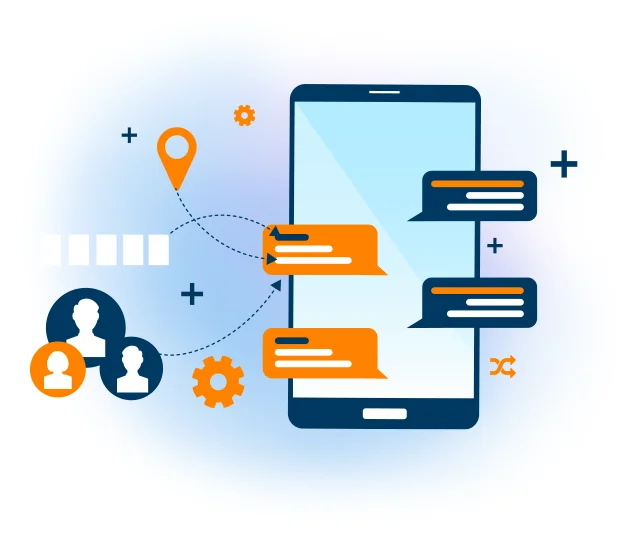
Personalization helps make newsletters more relevant. Instead of sending the exact same message to everyone, you can adapt your content based on your subscribers' information or behavior.
For example, you might:
- Use the subscriber's name in the greeting.
- Send different content to different audience segments.
- Promote different offers based on interests or past behavior.
- Adjust messaging depending on location or customer type.
Mailpro allows you to use personalized contact fields and segmentation to create newsletters that feel more relevant and targeted.
Personalization does not have to be complicated. Even small touches can make your newsletter feel more human and more effective.
XII. Optimizing Newsletter Deliverability and Engagement
Even the best newsletter will not perform well if it does not reach the inbox. That is why deliverability matters.
Here are some essential best practices:
- Maintain a clean email list: Remove invalid or inactive contacts regularly.
- Use double opt-in: This helps keep your list cleaner and more engaged.
- Segment your audience: Relevance helps reduce complaints and improve engagement.
- Optimize for mobile: Use responsive emails so your content looks good on all devices.
- Avoid spammy writing: Don't overuse capital letters, excessive punctuation, or misleading subject lines.
- Test before sending: Review links, formatting, and rendering carefully.
Deliverability and engagement go hand in hand. The more relevant, clear, and trustworthy your newsletters are, the better your results tend to be.
XIII. Measuring Newsletter Performance
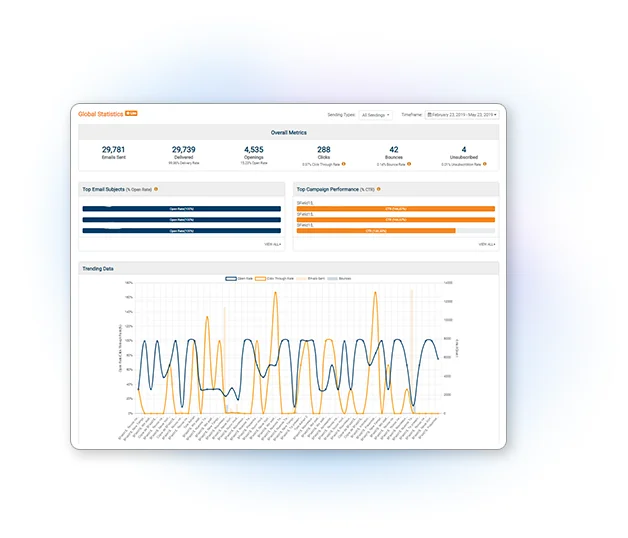
After sending your newsletter, review the results so you can improve the next one.
Key metrics to monitor include:
- Open rate: Shows how many subscribers opened the email.
- Click-through rate: Shows how many clicked on links.
- Conversion rate: Shows how many completed the desired action.
- Bounce rate: Helps identify delivery problems.
- Unsubscribe rate: Helps you understand whether the content is staying relevant.
Mailpro's email statistics help you understand how your campaigns are performing so you can refine your strategy over time.
XIV. Common Newsletter Mistakes to Avoid
When creating a newsletter, try to avoid these common mistakes:
- Sending without a clear goal.
- Using too much text and not enough structure.
- Adding too many CTAs in one email.
- Ignoring mobile users.
- Sending irrelevant content to everyone.
- Forgetting to test before sending.
- Using weak or misleading subject lines.
Avoiding these mistakes can make your newsletters more professional and easier for subscribers to engage with.
XV. Conclusion
Creating a newsletter does not have to be complicated. Once you understand your audience, define your goal, choose the right platform, and build a clear structure, the process becomes much easier.
A good newsletter should be useful, well designed, easy to read, and relevant to the people receiving it. Over time, newsletters can help you build stronger relationships, drive more traffic, and support your broader marketing goals.
With Mailpro, you can create, personalize, send, and track professional newsletters with ease. Whether you are just starting or looking to improve your email marketing, having the right tools can make a big difference.
Also read: The Ultimate Guide to Crafting the Perfect Newsletter Header
The Accessibility Node: "Accessible Email Design: Dyslexia & ADHD-Friendly Tips"
Ideal Newsletter Size: Everything You Need to Know
Ready to build one? Try Mailpro's new newsletter editor — every block you need, drag and drop, no code.
