Religious & Church Email Templates
Adapt for Unlimited Possibilities
Religious
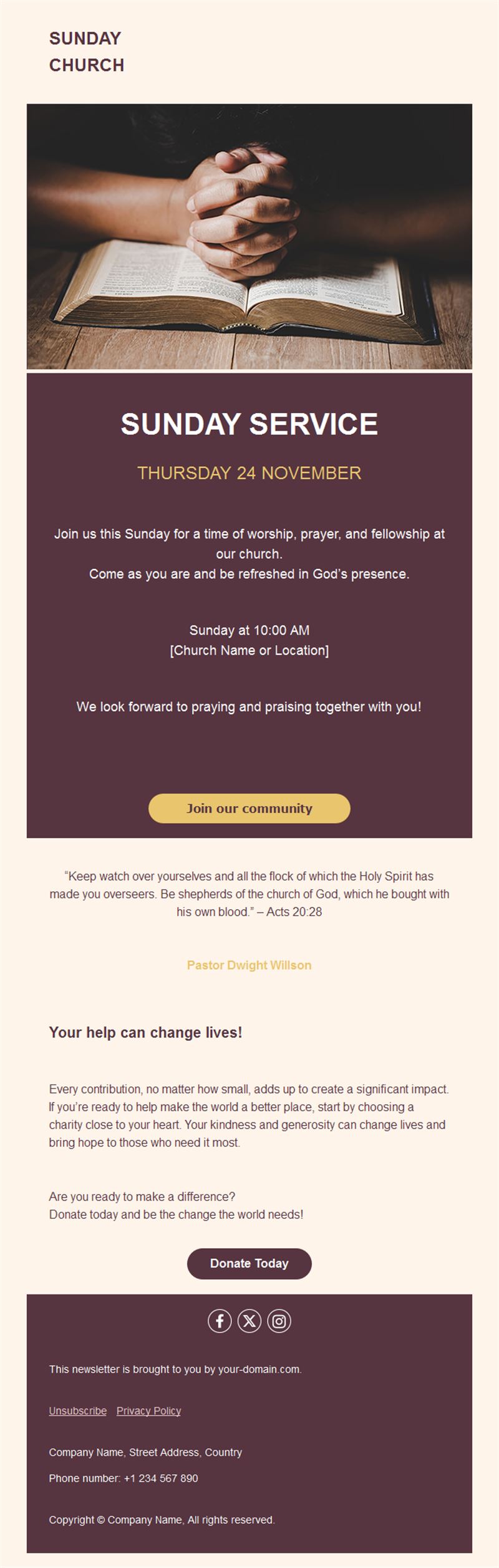
A connected congregation is a thriving one. Pick a ready-made religious email template, customize it in minutes, and send with Mailpro™.
Why use Religious email templates?
Between weekly gatherings, email keeps the community close: service times, celebrations, volunteer needs, and words of encouragement reach every member — including those who couldn’t attend.
- Weekly connection: a bulletin format that carries announcements and reflection.
- Holiday reach: special services and celebrations announced to everyone.
- Community mobilization: volunteer calls and support drives that get answered.
- Respectful design: warm, dignified layouts for every tradition.
What can your community send?
1) Weekly bulletins
Service times, announcements, and a reflection or verse for the week.
2) Holiday celebrations
Special services and festival schedules the whole community can plan around.
3) Community news
Weddings, births, milestones, and prayer requests shared with care.
4) Volunteer & support drives
Food banks, fundraisers, and helping-hands calls with signup links.
5) Words of encouragement
Midweek reflections that reach members wherever they are.
What's inside each template?
- Warm header with community name and imagery.
- Schedule block for services and gatherings.
- News section for community milestones.
- Volunteer call-to-action with signup.
- Contact links and an easy unsubscribe footer.
How to customize your Religious email in Mailpro™
- Pick a template: Open Templates and choose a Religious design.
- Edit copy & images: Warm, welcoming language; photos of real community life (with consent).
- Add a countdown (optional): Count down to major celebrations or fundraising goals. See how the countdown works.
- Segment your audience: Families, youth groups, and volunteers have different needs. Learn segmentation.
- Schedule the send: A consistent day each week; holiday notices well ahead. Schedule email campaigns.
- Track results: Monitor opens, clicks, and conversions. View email statistics.
- Automate follow-ups: Welcome new members automatically with community info. Set up autoresponders.
Subject line & CTA ideas
Subject lines
- This week: services, events, and a word of hope
- Join us for the Easter celebration
- 12 volunteers needed for Saturday’s food drive
- Celebrating the Müller family’s new arrival
- A midweek reflection for you
CTA ideas
- See Service Times
- Join the Celebration
- Sign Up to Help
- Read the Reflection
Best practices for Religious campaigns
- Consistency comforts: the same weekly send becomes part of members’ rhythm.
- Celebrate people: milestones shared build belonging.
- Ask specifically: “12 volunteers Saturday” beats vague appeals.
- Reach the absent: email includes those who couldn’t attend in person.
- Honor privacy: share personal news only with permission.
FAQ: Religious email templates
What should a church newsletter include?
Service times, one or two announcements, community milestones, and a short reflection — consistent and scannable.
How often should we send?
Weekly, on the same day — plus special notices for holidays and urgent community needs.
How do we reach older members?
Email’s simplicity shines: large readable layouts, clear dates, and printable formats work across generations.
Can new members be welcomed automatically?
Yes — a Mailpro welcome series introduces services, groups, and ways to get involved.
Get started
Keep the flock informed and inspired: pick a religious email template and stay connected all week.